> For the complete documentation index, see [llms.txt](https://docs.neodove.com/llms.txt). Markdown versions of documentation pages are available by appending `.md` to page URLs; this page is available as [Markdown](https://docs.neodove.com/admin-portal/integrations/aisensy-integration.md).
# Aisensy Integration
Learn how to integrate your NeoDove account with Aisensy
You’ll be able to **view** all the leads **generated** from Aisensy on NeoDove.
### Features that come with Aisensy integration
***
* **Make every lead count -** Any lead who sends a message to your account on Aisensy.com gets captured automatically into your NeoDove campaign, ensuring zero lead leakage.
* **Stop entering leads manually -** Lead gets captured and mapped automatically, thereby eliminating the effort of entering each lead detail manually.
#### Steps:
***
1. **Log in** to your NeoDove account ()
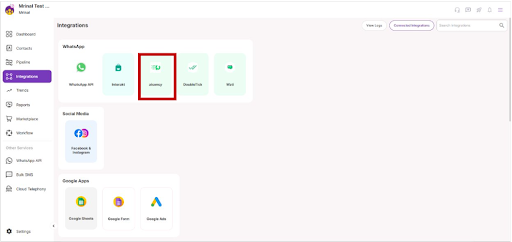
2. Go to the **Integrations** section, present on the left side-bar of your **screen**.
3. Once clicked, then need to click on the **"Aisensy"** option.
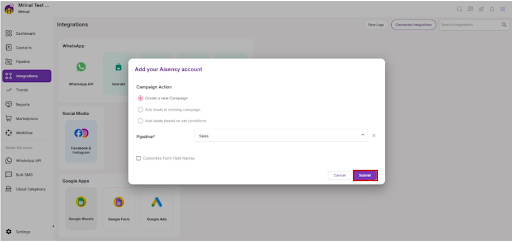
4. A menu bar will appear, select the **campaign** for which you want to integrate **Aisensy.**
5. Now, click on the **Submit** button. The integration has been **created** in NeoDove successfully.
6. To **activate** this integration, you need to send some details via e-mail to the **Aisensy** team.
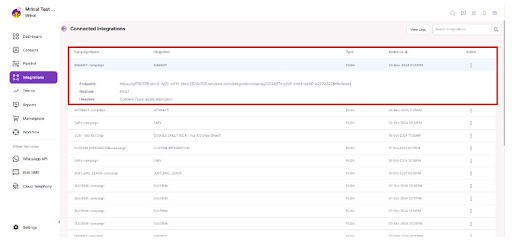
7. The **details** of this integration are present under this integration on **Active Integration page**. Just click on the created integration to **view the details.**
8. Details will appear, Copy these details and you need to send these complete details to your **Aisensy** **team** to send the lead details on **NeoDove API**.
9. Your integration will be **activated** by the **Aisensy** team.